Designing how documents print: the linet.print/1 template
On the DynaPrint v2 engine a document prints from a template, a JSON
document in the linet.print/1 spec. It is plain data: the page, the look, the
header, an ordered list of blocks, the footer. Linet renders it as clean HTML with native
tables and prints it to PDF. You read and write templates through API v2, and a person
edits the same thing on the Print Design screen.
v2 (on its document type's screen, or PUT /print-templates/views/{id}/engine);
every other view keeps printing with the classic templates. The JSON Schema:
/print/linet.print-1.schema.json.
The layers
What a document prints with is built from these layers, each on top of the one below:
- The built-in template:
GET /print-templates/default. Complete, never changes per company. - The print view's classic settings: a view switched to v2 starts from what it already printed (its chosen columns, its show/hide settings, its barcode). Read-only here; it is the view's classic setup.
- The company's design:
/print-templates/company. Holds only what the company overrides. - A print view's design:
/print-templates/views/{id}. Holds only what that view overrides, over the company's design.
A layer is a JSON Merge Patch
over the layer below: a value replaces, an object merges, null removes a key.
One exception: blocks merge by block id.
| A block entry in a layer | does |
|---|---|
| {"id": "lines", "qty_sum": true} | changes the block lines; its other keys stay |
| {"id": "payments", "remove": true} | drops the block |
| {"id": "thanks", "type": "text", "text": "…", "after": "totals"} | adds a block after totals ("after": "^" puts it first; no after appends it) |
| {"id": "notes", "after": "^"} | moves an existing block |
A change to a lower layer still shows through every key a higher layer does not set. A layer that would not make a valid template is refused on write. One that somehow is invalid at print time is skipped, never breaking a print.
The template
{
  "spec": "linet.print/1",
  "page":   { "size": "A4", "orientation": "portrait", "margins_mm": { "top": 14, "end": 12, "bottom": 16, "start": 12 } },
  "theme":  { "font": "sans", "font_size_pt": 10, "color_text": "#1f2328", "color_accent": "#0b5cad", "color_muted": "#6b7280", "table": "lines" },
  "header": { "logo": { "show": true, "max_height_mm": 22, "align": "start" }, "company": ["name", "vat_number", "address"], "text": "" },
  "blocks": [ /* in print order, below */ ],
  "footer": { "text": "", "page_numbers": true, "show_on": "last" }
}
| Key | Values |
|---|---|
| page.size | A4, A5, Letter, Legal |
| page.orientation | portrait, landscape |
| page.margins_mm | top, end, bottom, start: 0–50. start/end follow the language's direction (right/left in Hebrew). |
| theme.font | sans (Assistant), serif (Frank Ruhl Libre). Both cover Hebrew and Latin and are embedded in every print. |
| theme.font_size_pt | 7–14 |
| theme.color_* | #rrggbb: text, accent (headings, table headers, rules), muted (labels) |
| theme.table | lines, zebra, boxed |
| theme.css | your own CSS, scoped to the print: see Custom CSS below |
| footer.show_on | last (the text after the last block), every (on every page, as text) |
| footer.page_numbers | "n / total" at the foot of every page |
Every key is optional in a layer; unknown keys are refused everywhere, so a typo is an error, not a silent no-op.
Blocks
Each block has an id (lower-case letters, digits, _; unique) and a
type. Every block also takes show (false hides it), title
(a heading), align (start, center, end) and when: has_lines,
has_payments, foreign_currency or doctype:3,8.
| type | Prints | Its own keys |
|---|---|---|
| title | The document type and number, and the copy label (Source / Certified Copy) | show_copy_label |
| doctype_text | The document type's own header or footer text (as set on the type, else the company's) | part: header, footer |
| parties | The recipient | fields: recipient fields |
| fields | Label / value pairs about the document | fields: document fields |
| lines | The lines, a table whose header repeats on every page | columns: [{field, label?, width?, align?}], qty_sum, descriptions, group_by ("group": one titled table per line group, with a subtotal each, by the company's line-grouping setting; lines no group claims print first, untitled) |
| payments | The payments (receipts) | columns |
| totals | The totals, at the end of the line | rows: totals rows, in order |
| custom_fields | The document's custom fields | fields: "all" or keys |
| text | Text with fields bound into it | text |
| html | Formatted text (sanitised: no scripts, styles or event handlers) | html |
| code | A QR code or barcode | kind: tax_qr, pay_link_qr, barcode (code 128), code39 (the document's type and number, as text under the bars) |
| signature | The digital signature stamp, on a signed PDF | — |
| spacer | Empty space | height_mm |
| page_break | A new page | — |
Labels (title, a column's label) are text, or text per language:
{"he_il": "פריט", "en_us": "Item"}. Without one, the print uses Linet's own
wording in the print language.
The fields
| Where | Names |
|---|---|
| document | id, type_id, type_name, number, issue_date, due_date, reference, currency, currency_rate, comments, description, copy_label, allocation_number, language, status, sales_rep, account_balance; custom fields as document.custom.<key> |
| recipient | name, vat_number, address, shipping_address, phone, email, contact |
| company | name, vat_number, address, phone, fax, email, website, logo |
| lines columns | line, item_id, sku, manufacturer_sku, manufacturer, picture (the item's picture), barcode (the item's code as a barcode), name, description, serial, warehouse, warehouse_address, qty, unit, unit_price, unit_price_with_vat, unit_price_after_discount, discount (without VAT; a percentage discount prints its percent), line_total, line_total_with_vat, vat_rate, currency; a line custom field as custom.<key> |
| payments columns | line, method, details, date, amount, amount_in_doc_currency, currency |
| totals rows | subtotal, discount, exempt, taxable, vat_by_rate, vat, rounding, total, local_currency_total, qty_sum, paid |
The figures are the document's stored ones. vat_by_rate prints one VAT row per
rate (adding up to the document's VAT). A row with nothing to say (a zero discount, no
rounding) is left out. Costs and other internal values are not in the vocabulary.
A complete example
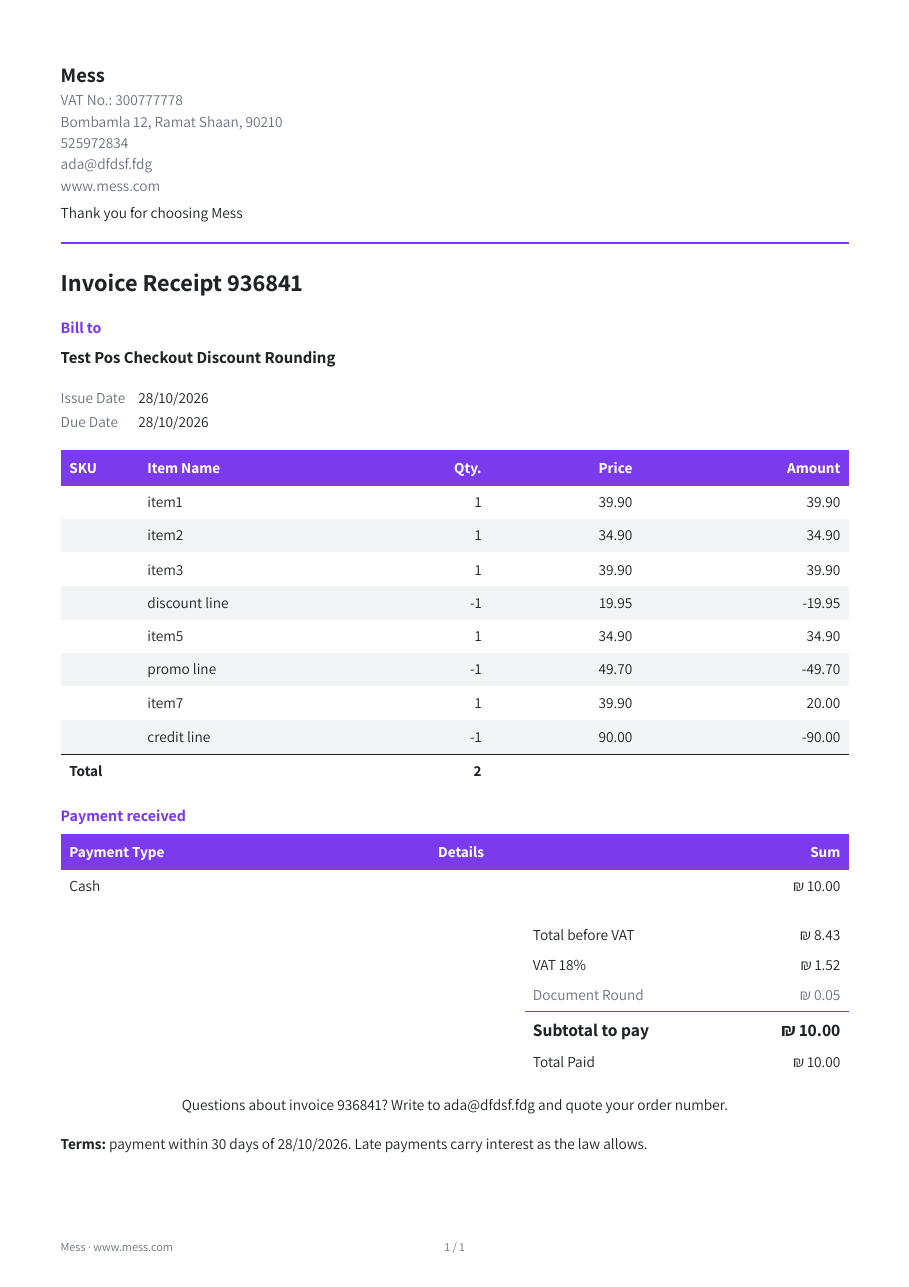
A whole template, and what it prints on a real invoice-receipt (English, eight lines, one cash payment). Download it: example-invoice.json · the PDF: example-invoice.pdf.
{
  "spec": "linet.print/1",
  "page": { "size": "A4", "orientation": "portrait", "margins_mm": { "top": 14, "end": 14, "bottom": 18, "start": 14 } },
  "theme": {
    "font": "sans",
    "font_size_pt": 10,
    "color_text": "#1f2328",
    "color_accent": "#7c3aed",
    "color_muted": "#6b7280",
    "table": "zebra"
  },
  "header": {
    "logo": { "show": true, "max_height_mm": 20, "align": "start" },
    "company": ["name", "vat_number", "address", "phone", "email", "website"],
    "text": "Thank you for choosing {{company.name}}"
  },
  "blocks": [
    { "id": "title", "type": "title", "show_copy_label": true },
    { "id": "recipient", "type": "parties", "title": { "en_us": "Bill to", "he_il": "לכבוד" }, "fields": ["name", "vat_number", "address", "email"] },
    { "id": "meta", "type": "fields", "fields": ["issue_date", "due_date", "reference", "allocation_number"] },
    { "id": "lines", "type": "lines", "when": "has_lines",
      "columns": [
        { "field": "sku", "width": "18mm" },
        { "field": "name", "width": "auto" },
        { "field": "qty", "width": "14mm" },
        { "field": "unit_price_with_vat", "label": { "en_us": "Price", "he_il": "מחיר" } },
        { "field": "line_total_with_vat", "label": { "en_us": "Amount", "he_il": "סכום" } }
      ],
      "qty_sum": true, "descriptions": true },
    { "id": "payments", "type": "payments", "when": "has_payments", "title": { "en_us": "Payment received", "he_il": "התקבל" },
      "columns": [ { "field": "method" }, { "field": "details" }, { "field": "amount" } ] },
    { "id": "totals", "type": "totals", "rows": ["discount", "taxable", "exempt", "vat_by_rate", "rounding", "total", "local_currency_total", "paid"] },
    { "id": "thanks", "type": "text", "align": "center",
      "text": "Questions about invoice {{document.number}}? Write to {{company.email}} and quote {{document.reference|default:\"your order number\"}}." },
    { "id": "terms", "type": "html", "when": "doctype:3,9",
      "html": "<p><b>Terms:</b> payment within 30 days of {{document.issue_date|date}}. Late payments carry interest as the law allows.</p>" },
    { "id": "code", "type": "code", "kind": "tax_qr", "align": "end" },
    { "id": "signature", "type": "signature" }
  ],
  "footer": { "text": "{{company.name}} · {{company.website}}", "page_numbers": true, "show_on": "every" }
}
What to notice:
theme: a purple accent and thezebratable style; the font is embedded, so the PDF looks the same everywhere.header.textand thethanksblock bind fields:{{company.name}},{{document.number}}, and{{document.reference|default:"…"}}, which falls back when the document has no reference.lines.columnschoose and order the columns, with widths and per-language labels;qty_sumadds the total-quantity row.when:paymentsonly on a document that has them,termsonly on invoices and invoice-receipts (types 3 and 9).codeasks for the tax QR. This document has no allocation number, so nothing is printed there: a block with nothing to say is left out.footer.show_on: "every"puts the footer text on every page beside "n / total".
As a layer you would send only what differs from the template below it, for example
PATCH /api/v2/print-templates/company with just {"theme": {"color_accent": "#7c3aed", "table": "zebra"}}.
The full form above is what GET /print-templates/company returns as effective.
The HTML it produces: the class map
Every print is one self-contained HTML document. Its structure and classes are part of
linet.print/1: stable within the version, so you can rely on them in tests, in
anything that reads prints, in your own html blocks, and in theme.css (below).
Every class starts with lp-.
<html dir="rtl|ltr" lang="he-il">            <!-- direction from the print language -->
  <head><meta name="generator" content="linet.print/1"> <style>…</style></head>
  <body>
    <div class="lp-doc lp-style-{theme.table}">
      <header class="lp-header lp-logo-{header.logo.align}">
        <div class="lp-logo"><img></div>
        <div class="lp-company">
          <div class="lp-company-name">  <div class="lp-company-line">…  <div class="lp-header-text">
      </header>
      <section class="lp-block lp-b-{type} [lp-align-{align}]" data-block="{id}">
        <h2 class="lp-block-title">           <!-- when the block has a title -->
        …the block's content, below…
      </section>
      …one section per block, in order…
      <footer class="lp-footer">              <!-- footer.show_on "last" -->
    </div>
  </body>
</html>
| Block type | Its content |
|---|---|
| title | .lp-title › h1, .lp-copy (the copy label) |
| doctype_text | .lp-html.lp-doctype-header / .lp-doctype-footer |
| parties | .lp-party-name, then dl.lp-pairs › dt label, dd value |
| fields, custom_fields | dl.lp-pairs › dt, dd |
| lines | table.lp-table.lp-lines › colgroup, thead (repeats on every page), tbody, tfoot (the quantity total, once); numeric cells td.lp-num; a line's description .lp-desc; a picture img.lp-pic; a line barcode .lp-line-code › img, .lp-code-text |
| lines, grouped | with group_by: "group": per group an h3.lp-group-title and its own table.lp-lines, whose tfoot has tr.lp-group-total (the group's subtotal) |
| payments | table.lp-table.lp-payments |
| totals | .lp-totals-wrap › table.lp-totals › tr, tr.lp-sub (secondary rows), tr.lp-total (the total) |
| text | .lp-text (line breaks kept) |
| html | .lp-html |
| code | .lp-code.lp-code-qr or .lp-code.lp-code-barcode › img (code39: then .lp-code-text) |
| signature | .lp-signature › img (the "computerised document" image, on a PDF) |
| spacer | an empty div of the given height |
| page_break | .lp-page-break |
| Modifier | Values |
|---|---|
| lp-style-* | lp-style-lines, lp-style-zebra, lp-style-boxed (theme.table) |
| lp-logo-* | lp-logo-start, lp-logo-center, lp-logo-end (header.logo.align) |
| lp-align-* | lp-align-start, lp-align-center, lp-align-end (a block's or a column's align) |
The theme reaches the stylesheet as CSS variables on :root:
--lp-font, --lp-size, --lp-text, --lp-accent,
--lp-muted, and for the on-screen preview --lp-sheet, --lp-sheet-h,
--lp-margins. The page itself (size, margins, page numbers) is an @page rule.
Custom CSS
theme.css is your own stylesheet, at any layer (the company's design or one view's).
Linet scopes it to the printed document: every selector is put under .lp-doc, and
html, body and :root mean .lp-doc itself. Target the
classes in the class map above.
{ "theme": { "css": ".lp-title h1 { letter-spacing: .02em; text-transform: uppercase }\n.lp-totals .lp-total td { font-size: 14pt }\n.lp-lines td.lp-num { font-variant-numeric: tabular-nums slashed-zero }\n@media screen { .lp-doc { box-shadow: none } }" } }
prints as
.lp-doc .lp-title h1{letter-spacing: .02em; text-transform: uppercase}
.lp-doc .lp-totals .lp-total td{font-size: 14pt}
.lp-doc .lp-lines td.lp-num{font-variant-numeric: tabular-nums slashed-zero}
@media screen{.lp-doc{box-shadow: none}}
| Rule | Why |
|---|---|
| @media print / screen only | No @import, @font-face, @page, @keyframes: the page and the fonts come from the template, and a print fetches nothing. |
| url() only as data:image | An embedded PNG, JPEG, GIF, WebP or SVG; nothing loaded from a server. |
| no <, no backslash, no expression(), javascript:, behavior: | Nothing can leave the stylesheet. |
| at most 20,000 characters |
A stylesheet that breaks a rule is refused on save (422 invalid_template, the problem by
name, e.g. theme.css: only @media print / screen is allowed (@import)).
Fields in text
In text and html blocks and the header and footer text,
{{path}} puts a field in, optionally through filters:
"Invoice {{document.number}} of {{document.issue_date|date}}"
"Total due: {{totals.total|money}}"
"Reference: {{document.reference|default:\"—\"}}"
"{{recipient.name|upper}}"
Filters: date (the company's date format), money (the document's
currency), upper, default:"…". Values are always escaped, and a value
is never read as a template itself. An unknown field prints nothing and is reported as a
warning in the preview, never as an error on a real print.
Reading and writing it
# the company's design: its layer, the effective template, a hash (also the ETag)
GET   /api/v2/print-templates/company

# change part of it (JSON Merge Patch, blocks by id); If-Match makes it conditional
PATCH /api/v2/print-templates/company
If-Match: "3f2a9c0d1e8b7a65"
{ "theme": { "color_accent": "#16a34a" }, "blocks": [ { "id": "code", "remove": true } ] }

# a delivery note's view: no prices, no totals -- then switch it to the new engine
PATCH /api/v2/print-templates/views/41
{ "blocks": [ { "id": "lines", "columns": [ {"field": "sku"}, {"field": "name"}, {"field": "qty"} ] },
              { "id": "totals", "remove": true } ] }
PUT   /api/v2/print-templates/views/41/engine
{ "engine": "v2" }
Reads need settings:read; writes need settings:write and the right to
edit document types. PUT replaces a layer, PATCH merges into it,
DELETE /print-templates/views/{id} drops a view's layer. Every write is
recorded in the company's settings history under the key's user.
A write that would not make a valid template is 422 invalid_template, with
every problem by path:
{ "error": { "code": "invalid_template",
  "problems": [ "theme.color_accent: a colour like #1f2328",
                "blocks[lines].columns: unknown field cost" ] } }
A stale If-Match is 412. The full reference: API v2 › Print templates.
How it prints
The page is described in standard CSS paged media inside the document itself
(@page size and margins, page-number margin boxes, a table header that repeats,
rows never split), with the fonts and the logo embedded, so the print fetches nothing and
looks the same in the preview and in the PDF. Hebrew prints right-to-left, English
left-to-right, from the same template. Signed PDFs are signed exactly as before.